Wireless CarPlay adapter vs portable CarPlay screen
Both get CarPlay onto a screen without a cable to the phone, but they start from opposite ends. An adapter has no screen of its own and borrows the car's CarPlay; a portable CarPlay screen is a complete CarPlay display that only needs power from the car. Which one you can use is decided by the car; which one you'd rather live with is decided by the details below.
Side by side
| Criterion | Wireless adapter | Portable CarPlay screen (example: Motorys) |
|---|---|---|
| What the car needs | Wired CarPlay in a data USB port | "A suitable power outlet"; Motorys lists a 12V/24V power cable for the cigarette lighter or accessory outlet |
| What changes in the car | A small device in the CarPlay port | A second screen on the dash top or windshield, plus its power cable; Motorys says the factory stereo and wiring stay untouched |
| Installation | Plug in, pair once | Mount, plug in, pair the phone; Motorys calls it "plug-and-play" |
| What's left of the stock screen | It becomes the CarPlay screen, and keeps its own menus | Untouched and still in use for the car's own functions; CarPlay runs on the added screen |
| Works without factory CarPlay? | No | Yes — Motorys says the car needs no built-in CarPlay or Android Auto |
| Screen size | Whatever the car has | 10.26 inches on this example |
| Sound | Through the car, exactly as with wired CarPlay | Through AUX, the screen's FM transmitter, or the car's Bluetooth where the car supports it |
| Phone requirement | Set by each adapter maker (checker) | "iPhone devices running iOS 10 or newer" |
| Moving it to another car | Only to another car with wired CarPlay | "Moves easily between vehicles" |
| Main trade-offs | Needs the right port and a car with wired CarPlay; adds a wireless link and its start-up wait | A screen and a power cable in view; with FM, sound quality depends on a clear frequency; steering-wheel buttons and the car's microphone aren't mentioned on the page |
Examples, not recommendations: the Motorys portable CarPlay screen page stands for the category; we don't cover these screens in our table and link no shop for them. Adapter facts are from each maker's page, linked on every adapter page. Read Nov 18, 2026.
The choice in three questions
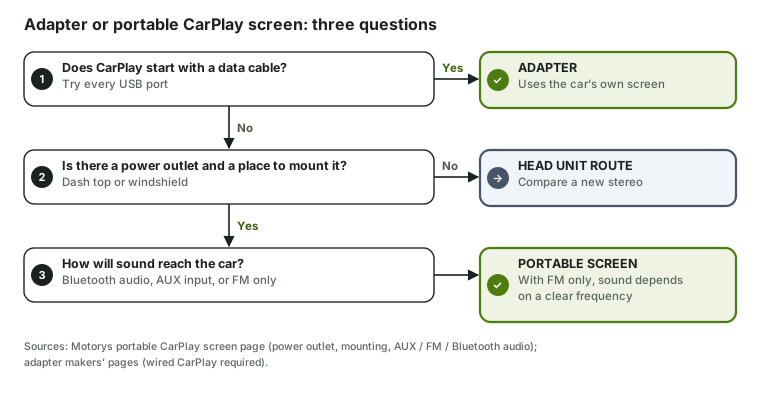
- Does CarPlay start with a data cable? If yes, an adapter keeps CarPlay on the screen built for it, with the car's speakers and buttons — the checker narrows the seven on sale. A second screen would duplicate what you have.
- Is there a power outlet, and somewhere to mount a 10-inch-class screen? If not, compare a new head unit instead.
- How will sound reach the speakers? Bluetooth audio or an AUX input in the car is the direct route; with FM only, plan on finding a clear frequency wherever you drive.
What day-to-day use looks like
With an adapter, starting the car looks like wired CarPlay with a short wait: the adapter boots, the iPhone joins it over Wi-Fi and CarPlay appears on the factory screen (how adapters work). Calls use the car's own microphone, as they do with a cable (calls and the microphone).
With a portable screen, the factory screen carries on as before and CarPlay lives on the added display, connected to the phone wirelessly. The Motorys page also lists versions with a rear camera or a dash cam. If you'd switch cars often, this is the one that travels; an adapter only travels between cars that already have wired CarPlay.
Sources
- Motorys Portable Wireless CarPlay Screen product page — power, mounting, audio routes, screen size, iOS requirement, configurations.
- Adapter makers' product pages, linked from each adapter page — wired CarPlay requirement.
- Apple, Use CarPlay with your iPhone (published Mar 6, 2025) — with wired CarPlay, you plug the iPhone into the car's USB port.
Sources checked: Checked Nov 18, 2026 · Updated 2026-11-18 · How this site works