Wireless CarPlay adapter vs a new head unit
These two solve different problems. An adapter cuts the cable from CarPlay your car already has; a new head unit swaps out the stereo itself, and with it whatever the factory screen did. The deciding facts are what your car has now and what its screen controls.
Side by side
| Criterion | Wireless adapter | New head unit (example: Pioneer DMH-W4660NEX) |
|---|---|---|
| What the car needs | Wired CarPlay already, in a USB port that carries data (how to tell) | A dash opening the unit fits: Pioneer lists this one as "2-DIN, Short Chassis" |
| What changes in the car | Nothing is removed; a small device sits in the CarPlay port | The factory stereo comes out and the new receiver goes in its place |
| Installation | Plug in, then pair the iPhone once (setup) | Dash removal and wiring. Pioneer says its fitment guide is for reference only, not guaranteed, and asks buyers to check every dimension, depth included |
| What's left of the stock screen | All of it: the factory screen, its menus and its buttons stay | Gone. Functions that ran through it need an integration module — Pioneer lists iDatalink Maestro RR and RR2 and Metra Axxess |
| Works without factory CarPlay? | No — there's nothing for it to convert | Yes — CarPlay comes with the unit |
| Wireless CarPlay | Through the adapter | Built in, wireless or over a USB cable |
| Steering-wheel buttons, camera | Unchanged | Ready for steering-wheel controls with an adapter sold separately; a dedicated backup-camera input |
| Undo it | Unplug | Refit the factory stereo |
| Main trade-offs | One more link (Bluetooth and Wi-Fi) between phone and car; published tests timed about 7 to 26 seconds to CarPlay (connection time) | A bigger job with parts to match to the car; a 6.8-inch screen on this example, which may differ from the screen it replaces |
Examples, not recommendations: the Pioneer DMH-W4660NEX product page stands for the category; we don't cover head units in our table and link no shop for them. Adapter facts are from each maker's page, linked on every adapter page. Read Nov 18, 2026.
The choice in three questions
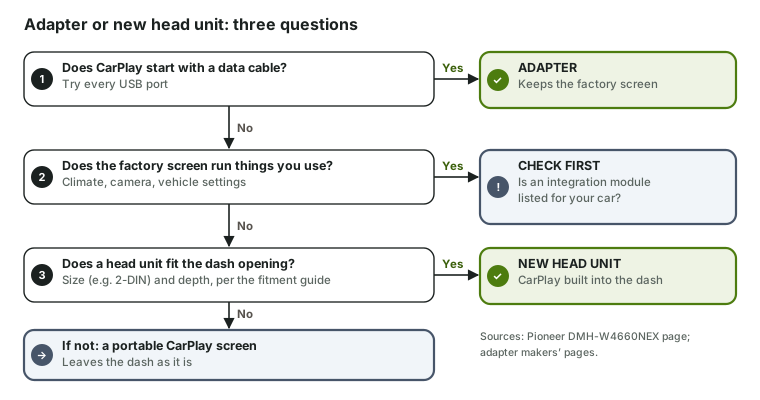
- Does CarPlay start with a data cable? If yes, an adapter is the smaller change and keeps everything — start with the checker. A head unit only makes sense here if you want to replace the stereo for other reasons.
- Does the factory screen run things you use — climate, a camera, vehicle settings? Then look up whether an integration module is listed for your exact car before choosing a head unit; if none is, a screen that leaves the dash alone is safer (adapter vs portable screen).
- Does a head unit physically fit? Check the opening size and the depth behind it against the maker's fitment guide. If it fits, a head unit puts CarPlay into the dash for good.
When you end up with both
A head unit with wired-only CarPlay can be paired with an adapter: the head unit adds CarPlay, the adapter makes it wireless. Whether that works depends on the adapter's maker — some name aftermarket units as supported, Ottocast excludes Sony units, and some say factory screens only. Those statements are collected on adapters for aftermarket head units. A head unit that already has wireless CarPlay, like the example above, doesn't need one.
Sources
- Pioneer DMH-W4660NEX product page and specifications — head unit type, CarPlay connection, steering-wheel control, camera input, OEM integration, fitment note.
- Adapter makers' product pages, linked from each adapter page — wired CarPlay requirement and aftermarket support.
- Apple, Use CarPlay with your iPhone (published Mar 6, 2025) — wired, wired-and-wireless and wireless-only cars.
Sources checked: Checked Nov 18, 2026 · Updated 2026-11-18 · How this site works