Calls with a wireless CarPlay adapter: whose microphone?
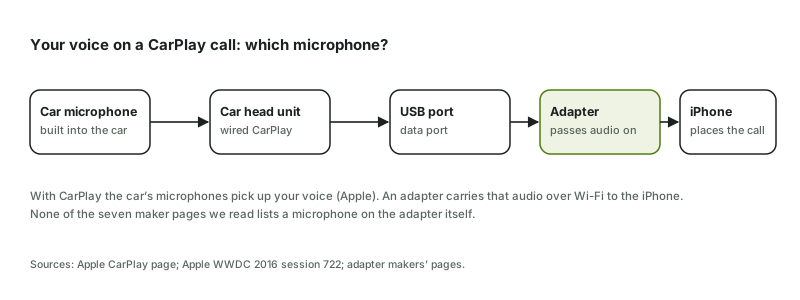
The car's. With CarPlay — wired or through an adapter — Apple routes calls through "your car's speakers and microphones". The adapter only carries that audio between the car and the iPhone, so call quality starts with the car's own microphone.
What Apple says
Apple's CarPlay page describes calls "using your car's speakers and microphones". Apple's 2016 developer session for car makers, Developing CarPlay Systems, explains that call and Siri audio runs both ways — car microphones to the iPhone, iPhone to the car speakers — and that in wireless CarPlay all audio travels over Wi-Fi. An adapter recreates that Wi-Fi leg; how adapters work shows the full chain.
What has been measured
Microphone: no published measurements for any model in our comparison table. What exists is call timing and reviewers' notes:
| Adapter | Published | Source |
|---|---|---|
| Ottocast Mini Cube 3.0 | 0.14 s call return delay; reviewer notes it uses the car's built-in microphone | CarPlay Life, Oct 22, 2025 — Cupra Born, USB-C port (named in the article) |
| CarlinKit Mini Ultra 3 | "clear call quality using the car's built-in microphone"; no number | CarPlay Life, Oct 8, 2025 — Cupra Born (named in the article) |
| Ottocast Mini | call delay rated excellent; no number | CarPlay Life, May 15, 2026 — car not stated |
| AAWireless TWO+ | "excellent call response"; no number | CarPlay Life, May 15, 2026 — car not stated |
| CarlinKit 5.0, both Aluratek models | no published data | — |
All from one tester. One tester, one car per review; numbers from different articles aren't comparable or averaged.
The cable test: is it the car or the adapter?
Because the microphone belongs to the car, the quickest way to judge call quality is a comparison. Make the same call twice: once through the adapter, once with the iPhone plugged in by cable. If the other person hears the same thing both times, the sound comes from the car's microphone and speakers, and no adapter will change it. If the other person can't hear you at all, see caller can't hear me. If the cable call is clearly better, the adapter's Wi-Fi link is the weak point — try the connection checks, especially the firmware step.
Siri and voice commands
Siri uses the same path as calls: the car's microphone, the head unit, the adapter, the iPhone. Apple's troubleshooting list for CarPlay includes making sure Siri is on, and Ford's SYNC steps ask you to verify Siri is enabled before anything else. If Siri doesn't answer the steering-wheel button through an adapter, check that first. The same Wi-Fi leg also carries music, so a link that drops calls usually drops music too — where delay comes from explains why.
Android Auto calls
The two-in-one adapters carry Android Auto over the same Wi-Fi link, so the same logic applies: the car's hands-free system does the listening. The only Android Auto audio figure published for a model in our table is the Mini Ultra 3's 0.11 s audio delay, timed by CarPlay Life in a Cupra Born. Nothing has been published on Android Auto call quality for any of them.
When call audio fails
One owner on X reported a CarlinKit 5.0 in a VW with an RCD300 radio where calls and the microphone stopped after a restart while music kept playing — a single report. Apple's own checks include making sure Siri is on. If CarPlay itself won't come up, work through the connection checks; a car shared by two phones may simply be connected to the other phone (switching).
Sources checked: Checked Nov 18, 2026 · Updated 2026-11-18 · How this site works