How wireless CarPlay adapters work
An adapter sits in the car's CarPlay USB port and pretends to be a wired iPhone. Your real iPhone talks to the adapter over Wi-Fi. That's all it does — so it can't add CarPlay to a car that doesn't have it.
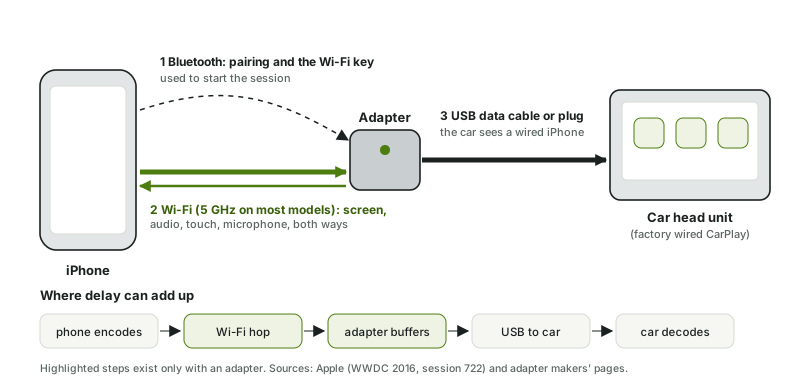
Three links in a row
- Bluetooth pairs the phone and hands over the Wi-Fi key. AAWireless puts it plainly on the product page for its TWO+: Bluetooth only passes the Wi-Fi credentials, then everything runs over Wi-Fi.
- Wi-Fi carries the screen, audio, touch and microphone both ways. Most of the adapters in our comparison table use 5 GHz; the CarlinKit 5.0 also lists 2.4 GHz.
- USB connects the adapter to the car. The car sees what looks like an iPhone on a cable — which is why the car must already support wired CarPlay. Ford's SYNC 3, for example, is wired-only (Ford page).
Where delay comes from
Compared with a cable, two steps are added: the Wi-Fi hop and the adapter's buffer. Published delay figures are few and come from one tester, CarPlay Life:
| What was timed | Result | Source |
|---|---|---|
| Call return delay, Ottocast Mini Cube 3.0 | 0.14 s | CarPlay Life, Oct 22, 2025 — Cupra Born, USB-C port (named in the article) |
| Track-skip delay, Ottocast Mini Cube 3.0 | 1.18 s | CarPlay Life, Oct 22, 2025 |
| Audio delay in Android Auto, CarlinKit Mini Ultra 3 | 0.11 s | CarPlay Life, Oct 8, 2025 — Cupra Born (named in the article) |
Listings that promise "0.01 s latency" aren't measurements; we don't repeat them. Connection time — from switching the car on to CarPlay on screen — is a different thing: 7 to 26 seconds in published tests, and the reviewer notes it depends on how fast the car powers its USB ports. The chart is on the home page.
Firmware updates
Adapters are small computers, and their makers fix car-specific problems with firmware. The route differs: AAWireless updates through its companion app, CarlinKit through a browser page served by the adapter itself, Ottocast over the air. Aluratek doesn't say on its product pages. Each model's route is in its maker row in the table; updating is also step six of the connection checks.
Charging your phone while using wireless CarPlay
With a cable, CarPlay charged the phone. With an adapter, the cable is gone and the CarPlay port is taken by the adapter. None of the seven maker pages we read mentions a charging pass-through port, so plan another way to charge:
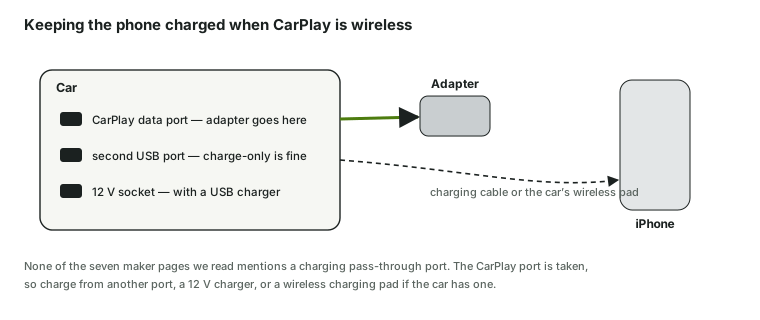
| Option | Works with an adapter? | Watch out for |
|---|---|---|
| Second USB port | Yes — a charge-only port is fine for charging | Plug-in adapters with a wide body can cover a neighboring port (port-spacing check) |
| 12 V socket with a USB charger | Yes | Uses the socket; nothing to do with CarPlay |
| The car's wireless charging pad | Yes, if the car has one | One owner on X went back to the cable to keep the phone charged and cool — a single report, not a pattern |
| Adapter's own pass-through | Not on the maker pages we read | Don't count on it |
Calls work the same either way: calls and the microphone. For a car shared by two phones, see adapters for two drivers.
Sources checked: Checked Nov 18, 2026 · Updated 2026-11-18 · How this site works