As an Amazon Associate I earn from qualifying purchases. Some links on this page are affiliate links — if you buy through them, we may earn a commission at no extra cost to you. Read our affiliate disclosure.
"Best" here means the adapter most likely to just work in a car you haven't seen: it covers both USB-A and USB-C ports without extra parts, and it pairs the same way every time. The rental still needs wired CarPlay — the adapter can't add it.
Illustration (AI-generated). Generic luggage on a back seat. How we make images.
What you don't know about a rental
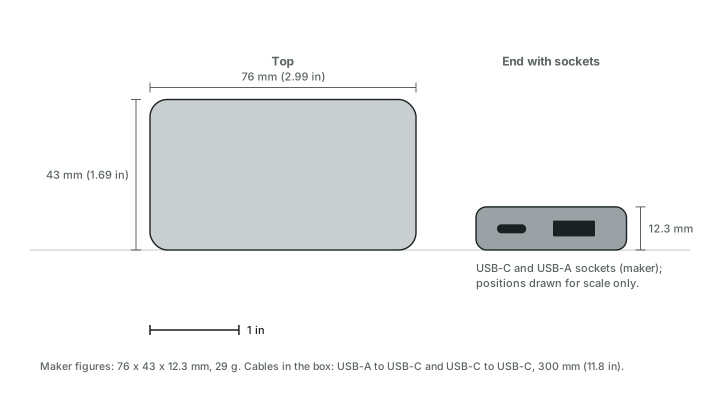
The port. It may be USB-A or USB-C, and only one may carry CarPlay (which USB port carries CarPlay). An adapter with both cables in the box removes one unknown.
Wired or wireless. If the rental already has wireless CarPlay, you won't need the adapter. If it has none, the adapter won't help. Plug your phone in with a cable first: if CarPlay appears, the adapter will have something to convert (the two-step test).
Someone else's phones. A rental may still list earlier drivers' phones. If your phone won't connect, Apple's steps include checking Bluetooth and Wi-Fi are on and that the CarPlay network is set to Auto-Join — the full list is in adapter won't connect.
When you return the car
Unplug the adapter — it's yours. On the iPhone, Apple's path to remove the car is Settings › General › CarPlay › select the car › Forget This Car. If you paired the phone directly with the rental's Bluetooth during the test, delete it from the car's phone list as well. What an adapter itself stores is covered in adapter security.
The closest matches
CarlinKit 5.0 (CPC200-2air)
Why it's here: USB-A to USB-C and USB-C to USB-C cables in the box; factory screens only, which suits rentals.
Switching:no published data
Limits: factory screens only, per the maker.
Skip it if you have an aftermarket head unit; you want published switching between phones.
Sources: maker page · full details · Amazon listing available when checked Nov 18, 2026.