Several phones, one wireless CarPlay adapter
An adapter talks to one phone at a time. When a second phone is in the car, what happens depends on the model: some reconnect to the last phone and make you disconnect it first, others switch with a button. Published switching times run from 9 to 42 seconds.
What each maker says
| Adapter | Second phone |
|---|---|
| AAWireless TWO+ | maker Button switches phones; unlimited phones paired maker pagetest 9–30 s to switch CarPlay Life, Dec 2025 (Dec 26, 2025; Cupra Born) |
| CarlinKit 5.0 (CPC200-2air) | no published data |
| CarlinKit Mini Ultra 3 | no published data |
| Ottocast Mini (2-in-1) | maker One-button switching maker pagetest 42 s to Android Auto, 23 s back to CarPlay; 21–26 s iPhone to iPhone CarPlay Life, Nov 2025 (Nov 30, 2025; car not named) |
| Ottocast Mini Cube 3.0 | maker Disconnect the current phone to switch maker page |
| Aluratek AWCPA01F | no published data |
| Aluratek AWCGN01F | maker Product text: toggle switch for 2 phones maker pagemaker FAQ on the same page: "Only 1 phone can connect at a time" maker page |
| Ottocast U2AIR Pro | Reconnects to the last-used phone; to switch, disconnect CarPlay on the current phone |
Published switching times
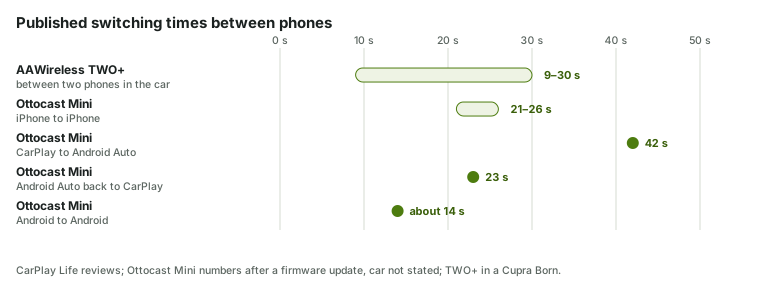
Switching between CarPlay and Android Auto takes longest: CarPlay Life timed the Ottocast Mini at 42 s, with a "short double-reboot cycle" in between. Two Android phones took about 14 s, two iPhones 21–26 s. The TWO+ took 9–30 s between two phones in its own review. Head to head: TWO+ vs Ottocast Mini.
Without a button
Ottocast's FAQ describes the usual behavior: the adapter reconnects to the last-used phone; to switch, disconnect CarPlay on the current phone, or turn off its Bluetooth or Wi-Fi. That works, but in daily use it means the second driver asks the first to change settings. CarPlay Life's 2026 roundup notes that some adapters "struggle to prioritise which device should connect first" and that drivers end up disconnecting Bluetooth or unplugging the adapter.
Making it smoother
- Set a priority phone where the adapter allows it — CarPlay Life notes the AAWireless app can set device priority.
- Forget the car on a phone that shouldn't connect. Apple: Settings › General › CarPlay › your car › Forget This Car.
- Keep the firmware current. The Ottocast Mini's button became a true switch only after an update (firmware updates).
- Watch the car's own Bluetooth. If one phone also pairs directly with the car for calls, the two connections can compete — see Bluetooth conflict.
iPhone and Android in one car
Mixed households pay the biggest time penalty. The adapter has to tear down one system and start the other, and the car's head unit may also switch modes: CarPlay Life saw the Ottocast Mini go through a "short double-reboot cycle" before Android Auto came up. The car itself must support both wired CarPlay and wired Android Auto for this to work at all. Every maker here sets Android 11 as the Android floor, with Ottocast adding some Samsung and Google phones on Android 9. The picks for this case are on iPhone and Android.
The Aluratek contradiction
The AWCGN01F page promises a toggle to switch between two phones, while its FAQ says "Only 1 phone can connect at a time". Both might be true — two phones paired, one connected — but the page doesn't say. If switching is the reason you're buying, ask Aluratek first.
Picks for shared cars are on two drivers and iPhone and Android.
On X, 2 of the 23 owner questions we read asked about sharing an adapter between phones.
Sources checked: Checked Nov 18, 2026 · Updated 2026-11-18 · How this site works